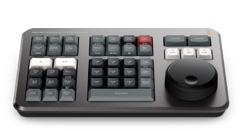
Dedicated Design: Optimized for the DaVinci Resolve Cut Page, but also works with the Edit Page.
Large Search Dial: The precisely machined metal dial allows for high-precision scrolling and scrubbing through the timeline, J-Cut/L-Cut, and trimming.
Direct Control Buttons: Physical buttons for crucial editing functions like Smart Insert, Close Up, Ripple Overwrite, Source Tape, Sync Bin, etc.
Two-Handed Operation: Allows one hand to control the search dial and the other hand to trigger cut and edit commands, significantly increasing workflow speed.
Versatile Connectivity: Supports wired USB-C and wireless Bluetooth connectivity, along with a built-in battery for wireless use.
Specialized Trim Functions: Buttons for Roll, Slip, Slide, and Source allow for much faster clip timing and position adjustments than a mouse.
The Search Dial is the heart of the Speed Editor. It provides a tactile feel that a mouse cannot.
You can use the dial to scroll quickly through long clips (Scrolling), or use it for detailed adjustment of the In and Out points of a shot (Trimming).
With Source Tape mode, you can scrub through all clips in a Bin as if they were a single reel of tape.
2. Smart Editing Buttons:
The Speed Editor features smart editing functions assigned to physical buttons: Smart Insert: Inserts the clip into an automatically calculated timeline position.
Ripple Overwrite: Overwrites the old clip with the new clip while maintaining the overall timeline duration.
Close Up: Automatically creates a zoomed version of the clip. These buttons eliminate the need for clicking and dragging, allowing you to focus on creativity rather than manipulation.
3. Ergonomic and Durable Design:
Compact size, easy to carry and place on your desk. The buttons have a professional feel and backlighting, while the metal dial ensures long-term durability and precision.
4. Mobile Editing:
Thanks to Bluetooth connectivity and a built-in battery, you can use the Speed Editor cleanly with a laptop, ideal for on-set or mobile editing.